 RecVault
Stop taking notes and start listening
The person taking minutes is the person least involved in the meeting. Put your phone on the table, tap the mic and take part. Afterwards you have the full conversation, and a transcript whenever you want one.
RecVault records what your phone's microphone hears, so it suits in-person meetings, stand-ups, one-to-ones and client conversations. It is a recorder, not a bot that joins video calls.
Remember the word, not the date
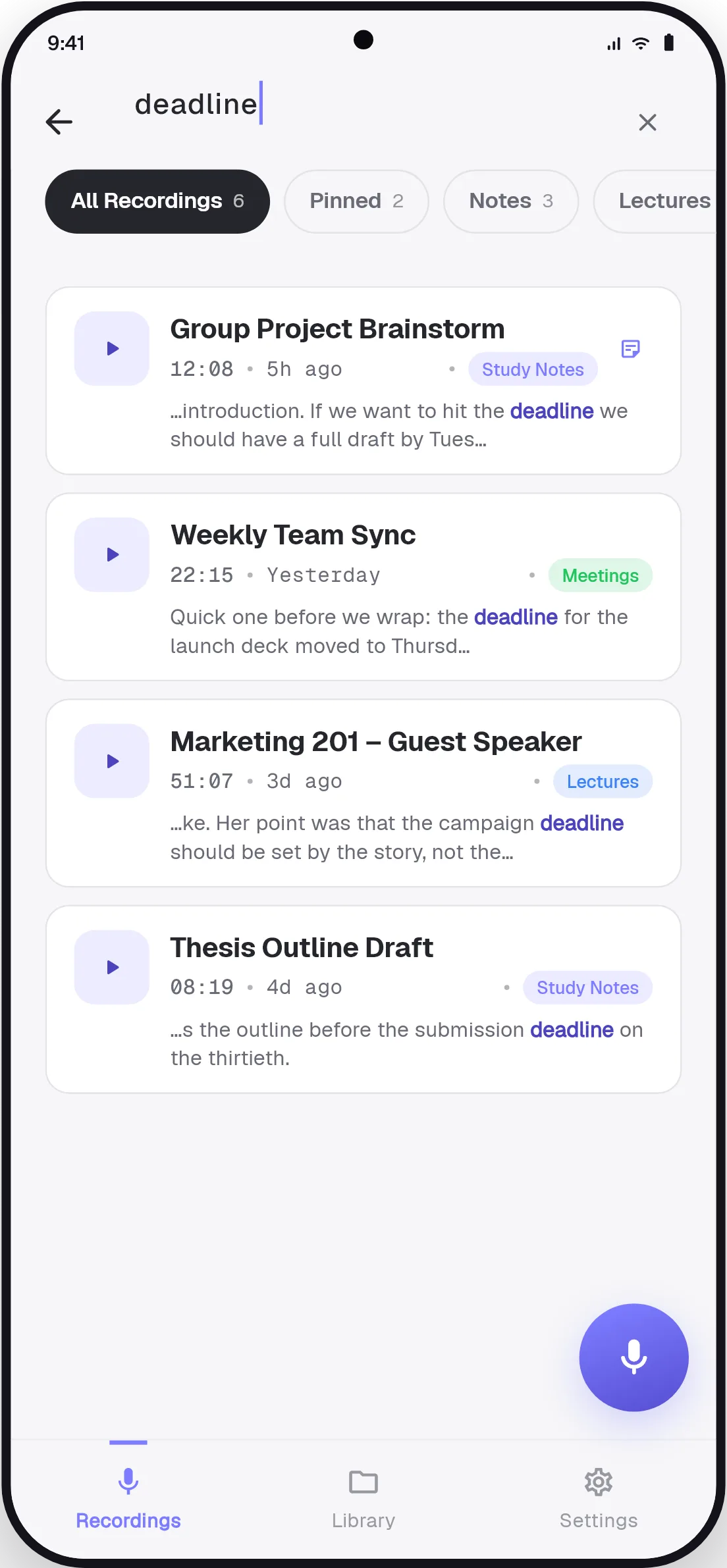
Three weeks later someone asks when the launch date was moved. You remember the word "deadline" but not which meeting it came up in. Search for it. RecVault looks inside every transcript and lists each recording where the word was said, with the sentence around it.
Private by default
Meeting audio often contains things that should not sit in someone else's cloud. RecVault keeps recordings in the app's private storage on your phone. Audio is uploaded only when you tap Transcribe on a specific recording, and it is not stored after the text comes back.
How to record and transcribe a meeting
- Tell people you are recording
Get agreement first. In many places it is a legal requirement.
- Tap the mic
Place the phone in the middle of the table. Recording continues with the screen off.
- Bookmark decisions
Tap bookmark when an action or a decision is agreed.
- Transcribe and file it
Tap Transcribe, add the recording to a Meetings category and attach any follow-up notes.
Good to know
- Transcription covers up to 10 minutes per recording. Starting a new recording for each agenda item keeps every part within that and makes the result easier to scan.
- The transcript is plain timestamped text without speaker names. Tap a line to hear who said it.
- Share the transcript to email or chat straight from the app when you send the follow-up.